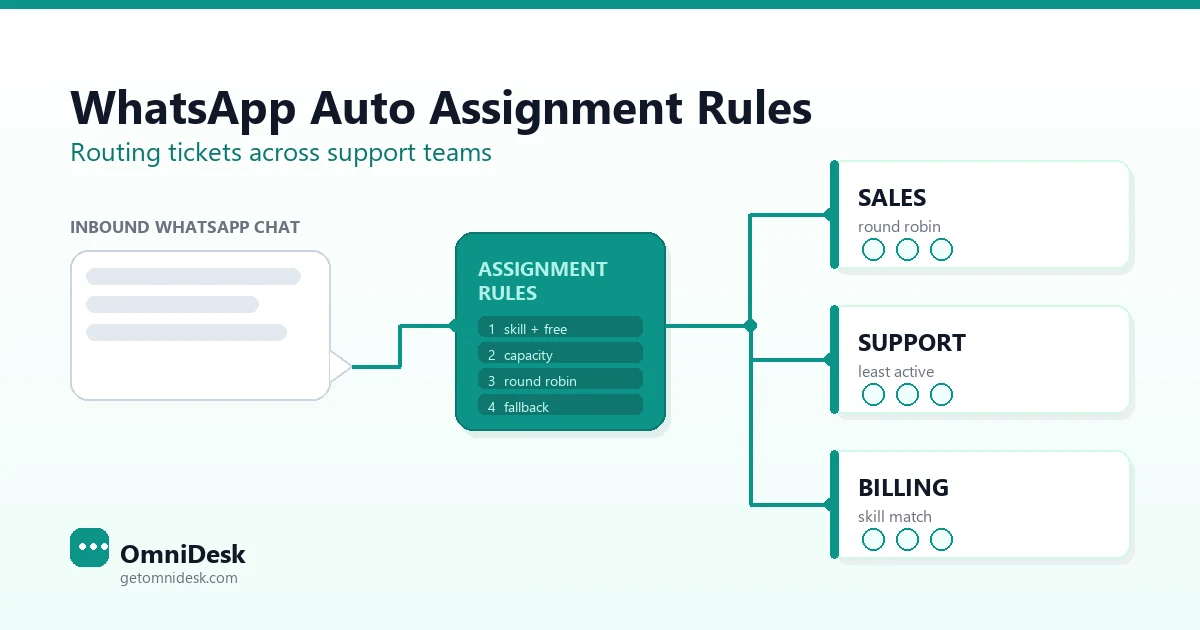
WhatsApp Auto Assignment Rules 2026: Routing Tickets Across Support Teams
Meta has no concept of an agent — every queue, owner and escalation is built by your inbox. Here is how assignment rules are ordered, what happens when nothing matches, and the rule set that routes one WhatsApp number across sales, support and billing.
Every WhatsApp support team eventually hits the same wall. The number works, the shared inbox is connected, agents can all see the same conversations — and nobody knows which chat is theirs. Two agents answer the same customer. A billing question sits untouched for four hours because everyone assumed the other team had it. A VIP account waits behind a routine delivery query.
The fix is not more agents. It is a set of whatsapp auto assignment rules that give every incoming conversation an owner within seconds of arrival, and a defined path to a different owner when the first one cannot take it.
This guide is about the rules layer itself: how assignment rules are structured, the order they evaluate in, what happens when nothing matches, and how to route across several teams rather than round‑robin inside one. If you are still setting up basic distribution for a single team, start with our walkthrough on how to assign WhatsApp chats to the right agent automatically and return here when you need a rule set that spans departments.
Meta Does Not Assign Chats — Your Inbox Does
This is the single most useful thing to understand before you write a rule. There is no concept of an “agent” anywhere in the WhatsApp Business Platform. Meta delivers an inbound message to your business phone number via webhook, and that is the end of its involvement. It does not know your team structure, your shifts, your skills matrix, or who is online.
Everything covered on this page — queues, ownership, round robin, capacity, escalation — is implemented entirely by the inbox software sitting between Meta’s API and your team. That has three practical consequences:
Internal reassignment costs nothing. Moving a conversation from one agent or team to another is a database write in your inbox, not a WhatsApp message. You can hand a chat around as many times as the workflow needs without touching your messaging spend.
Your rules are only as good as your inbox’s rule engine. Two vendors on the same official API can offer wildly different routing capability. Evaluate the rule builder, not the API access.
The WhatsApp Business app cannot do this at all. The app is built around one account signed in on a primary phone with a small number of additional linked devices. Everyone linked sees the same undifferentiated inbox. There is no ownership field to assign, so there is nothing for a rule to write to. Automatic assignment requires the WhatsApp Business Platform (Cloud API) plus an inbox that layers ownership on top — see how to connect WhatsApp to a shared team inbox for the connection steps.
Three Assignment Methods Cover Almost Every Support Team
Underneath every vendor’s marketing language, automatic assignment resolves to a small number of selection strategies. Microsoft’s unified routing documentation for Dynamics 365 is the most thoroughly published description of these mechanics in the industry, and it names them cleanly. The same three patterns show up in every WhatsApp inbox worth using.
Method
How the winner is picked
Best fit
Failure mode
Round robin
Next agent in a rotation. Order starts from when each agent joined the queue, then updates after every assignment.
Interchangeable agents, similar conversation length, fairness matters more than speed.
Ignores how loaded an agent already is. A rep stuck on one long complaint still gets their turn.
Highest available capacity
Agent with the most free slots against a configured concurrent-chat limit. Ties broken by round robin.
Mixed conversation lengths, part-time agents, anyone carrying work from other channels.
Can starve a fast agent, who clears chats quickly and therefore always looks free.
Least active
Agent who has gone longest since a conversation released their capacity, counted across every queue they belong to.
Messaging and voice teams where the same people cover more than one channel.
Needs accurate wrap-up settings, or an agent doing after-call work reads as idle.
Skill-based routing is not a fourth method. It is a filter applied before any of the three run: narrow the eligible pool to agents who hold the required skill, then pick one of them by capacity, rotation, or idle time. Most mature setups end up doing exactly that — filter by skill, distribute by load — rather than committing to a single rule.
There is also a fourth option that deserves more respect than it gets: no automatic assignment at all. Conversations land in a queue and agents pull the next one themselves. For a small, co‑located team this outperforms a badly tuned rule set, because a human reading the message picks better than a rule matching a keyword. The trade‑off is that an unattended queue is now your responsibility to watch.
Rules Evaluate in Order, and the First Match Wins
An assignment ruleset is an ordered list, not a scored competition. The engine walks the list from the top. The first rule whose conditions match a set of agents wins, its order‑by clause picks the individual, and no later rule is evaluated. If a rule matches nobody, the engine falls through to the next one.
That ordering is the whole design. You write your strictest, most specific rule first and progressively relax the constraints below it. The pattern for a three‑rule ladder looks like this:
Rule 1  Skill = Arabic  AND  Skill = Billing  AND  Presence = Available
        order by: least active

Rule 2  Skill = Billing  AND  Presence = Available
        order by: highest available capacity

Rule 3  Team = Support  AND  Presence = Available OR Busy
        order by: round robin
An Arabic‑language billing query goes to a specialist if one is free. If not, it drops to any available billing agent. If billing is entirely offline, it lands with general support rather than sitting in limbo. Each step down trades precision for coverage, which is exactly the trade you want to make automatically at 2 am.
Get the order backwards — broad rule first — and your specialists never receive anything, because the general rule matches first every time and the engine stops. This is the most common rule‑set bug in production, and it is silent: nothing errors, chats just quiet
ly stop reaching the people you hired for them.
Cross-Team Routing Needs Classification Before Assignment
Assignment answers “which agent?”. It cannot answer “which team?” — that has to be decided first, and it is a separate step with separate inputs. Trying to collapse both into one rule is why multi-team WhatsApp setups usually feel unpredictable.
Classification runs on attributes of the conversation. Assignment runs on attributes of the agent. Keep them apart:
Menu selection. The most reliable signal you can get. An interactive list or reply-button menu at the start of the conversation returns a structured value, not free text. If you can persuade customers through one tap, classification stops being guesswork.
Keyword and phrase matching. Cheap and transparent, but brittle across dialects and typos. Fine as a secondary signal, dangerous as the only one on an Arabic-and-English inbox — see our notes on multilingual WhatsApp support across Arabic and English.
Customer record lookup. Plan tier, open order, account owner, outstanding invoice. This is where cross-team routing gets genuinely good: a message from a contact with an open ticket should reach the team already handling it.
Entry point. A click-to-WhatsApp ad, a QR code on an invoice, and a link in the checkout confirmation are three different intents arriving on one number. The referral data on the inbound webhook tells you which, and it is free classification you are probably discarding.
Time of day. The same question at 03:00 belongs to a different queue than at 11:00, regardless of content.
Once classification has picked a queue, the assignment ruleset for that queue picks the person. Two layers, two rule sets, debugged independently. When a chat lands in the wrong place, you can immediately tell whether classification misread the intent or assignment picked a bad agent — a distinction you lose entirely with one flat rule list. If you are still using conversation labels to organise the inbox manually, labels are the natural output of the classification step and the natural input to assignment.
Every Rule Needs a Fallback Queue or Chats Go Nowhere
When no assignment rule in a ruleset matches an eligible agent, the work item does not vanish and it does not error. It stays in the queue and waits for the next assignment cycle. That is the correct engineering behaviour and it is also how conversations disappear for six hours: the system is behaving exactly as designed while nobody is looking at the queue.
An assignment cycle re-runs on a defined set of triggers — a new conversation arriving, an agent’s presence changing, an agent’s capacity being freed by a resolved chat, or an agent being added to the queue. Notice what is not on that list: nothing about the conversation itself ageing. A chat that matched nobody at 22:00 will keep matching nobody until an agent comes online. It is not escalating in the background.
So write the fallback explicitly for every queue:
A terminal rule with almost no conditions. The last rule in every ruleset should match any agent on the team with presence Available or Busy. It is the floor.
A named overflow queue. If even the floor rule matches nobody, move the conversation to a queue a supervisor actually watches. “Unassigned” is a state; “Overflow — Needs Owner” is a place with someone responsible for it.
An automatic acknowledgement to the customer. If a conversation is going to sit, say so. An auto-reply with a realistic response window is not a fix, but it converts an invisible failure into a managed expectation. Keep it honest against your real first response time benchmarks rather than a number you wish were true.
An alert on queue depth, not just on age. One conversation waiting 40 minutes is a bad morning. Nine conversations waiting 40 minutes is an outage, and it deserves a different notification.
Working Hours Are Not Automatic — You Have to Write Them In
Here is a genuinely counter-intuitive behaviour worth checking in your own tool before you trust it. Standard out-of-the-box assignment strategies typically do not consider an agent’s operating hours or shift calendar. They consider presence, capacity, and skills. If an agent’s status is Available, they are a valid target — whether or not their shift ended two hours ago and they simply forgot to sign out.
In Microsoft’s implementation this is explicit: to respect a representative’s schedule you have to build a custom assignment rule using an “is working” condition against their calendar. It is opt-in, not default.
Practically, that means one of three things in your setup:
Add a working-hours condition to your assignment rules, if your inbox exposes agent schedules as a rule attribute.
Force presence to change on schedule, so agents are automatically set to Offline at shift end rather than relying on them to do it.
Route by queue instead of by person outside business hours — a single after-hours queue with a deliberately short rule set and a clear auto-reply.
The third is the most robust for teams running extended coverage, and it pairs naturally with the shift design in our guide to running a 24/7 support operation without burnout.
The 24-Hour Customer Service Window Sets the Real Deadline
WhatsApp imposes a timing constraint that email and live chat do not, and it should shape your routing rules directly.
Meta’s documentation is unambiguous: when a WhatsApp user messages or calls your business, a 24-hour timer called the customer service window starts. If the user messages or calls again before it expires, the timer resets to 24 hours. While the window is open you can send free-form service messages. When the window closes, you can only send pre-approved template messages.
Read that as a routing requirement rather than a billing footnote. A conversation that sits unassigned for 20 hours has not just aged badly — it has nearly run out of the ability to be answered conversationally. Once the window shuts, your agent cannot simply reply. They need an approved template, which means the answer they wanted to send may not be sendable at all in that form.
Two rules follow directly:
Window expiry belongs in your escalation logic. Alert on conversations approaching the edge of the window, not only on SLA thresholds. An 18-hour warning on an unresolved chat is a far more actionable signal than a generic ageing report.
Prioritise by last customer message, not by conversation creation. For asynchronous channels, the sensible ordering is last interaction time. A conversation opened Monday, quiet since, and revived Thursday afternoon should queue behind customers who have been waiting since Thursday morning — because those are the people currently waiting.
Reassignment Rules Are Where Most Teams Under-Build
Initial assignment gets all the attention. Reassignment is where conversations are actually lost, because the first owner is a guess and guesses are wrong at a predictable rate.
Build four reassignment triggers:
No acceptance. If your inbox offers a conversation to an agent and they neither accept nor open it within a defined interval, reclaim it. Treat a timeout exactly like a decline.
No first response. Distinct from the above and more important. The agent accepted, the chat is theirs, and nothing has been sent to the customer. This is the failure that hides best, because the queue looks clean — every chat has an owner. Set a threshold well inside your published response target and route back to the queue when it trips.
Explicit escalation. The agent decides it needs a tier two or a different department. Make this a one-action move with a mandatory note, not an @mention someone might miss. Our three-tier WhatsApp escalation workflow covers the tier boundaries themselves.
Agent goes offline mid-conversation. Shift end, connection drop, sick day. Every open conversation owned by a newly offline agent needs a defined destination, and the default should not be “stays assigned to the person who went home”.
Also cap how many times a single agent can be re-offered work they have already refused. A sensible engine reduces an agent’s priority for a conversation after each decline and stops offering it entirely after a small number of attempts — three is a common default, with one to five as a reasonable configurable range. Without a ceiling, a declined conversation can bounce around the same rotation indefinitely while its customer waits. With a ceiling, it exits automatic assignment and becomes a supervisor’s problem, which is where it should have gone in the first place.
Sticky Assignment Keeps Returning Customers With the Same Agent
Sticky assignment — sometimes called agent affinity — routes a returning customer back to whoever handled them last, bypassing the normal rules. On WhatsApp specifically, this matters more than on other channels, because the channel is persistent. The customer scrolls up and sees the entire history. Being handed to a stranger who asks them to explain again reads as incompetence in a way it does not in a fresh email thread.
Affinity work typically jumps the prioritisation rules entirely and is assigned before other queued items. That is powerful and needs bounding, or your best agents accumulate a permanent book of customers and your rotation stops distributing anything.
Reasonable constraints:
A time limit. Stickiness for 72 hours or seven days, not forever. After that the customer re-enters normal routing.
A presence check. If the original agent is offline, fall through immediately rather than holding the chat for them.
A capacity override. Affinity should not push an agent past their concurrent-chat limit. A stranger answering now beats the right agent answering in an hour.
A scope rule. Sticky routing suits open issues and complaints. It suits a brand-new sales enquiry from an existing customer much less.
A Worked Rule Set for a Three-Team WhatsApp Operation
Concrete beats abstract. Here is a complete configuration for a company running Sales, Support, and Billing on one WhatsApp number, with a two-language team and extended hours.
Layer one — classification, evaluated top to bottom:
#
Condition
Destination queue
1
Contact has a conversation resolved in the last 72 hours
Sticky — previous owner
2
Contact record has an overdue invoice
Billing
3
Entry point is the click-to-WhatsApp ad
Sales
4
Menu selection = “Order or delivery”
Support
5
Menu selection = “Payment or invoice”
Billing
6
Menu selection = “Buy or upgrade”
Sales
7
Local time is outside 08:00–22:00
After Hours
8
Anything else
Support (default)
Layer two — assignment inside the Support queue:
#
Agent conditions
Order by
1
Skill = detected language AND Team = Support AND Presence = Available
Least active
2
Team = Support AND Presence = Available
Highest available capacity
3
Team = Support AND Presence = Available or Busy
Round robin
4
Team = Support or Sales AND Presence = Available
Round robin
Layer three — the safety net, applied to every queue:
Offered but not accepted in 90 seconds → return to queue, exclude that agent for this conversation.
Three declines by the same agent → that agent is no longer offered this conversation.
Assigned but no outbound message in 10 minutes → return to queue and notify the team lead.
Unassigned for 20 minutes → move to Overflow — Needs Owner and alert the supervisor.
Owner goes offline with the conversation open → return to that team’s queue immediately.
Customer service window has under six hours remaining and the conversation is unresolved → flag it.
Note how few of these are about picking the right agent. Most of the configuration is about detecting that the pick failed. That ratio is correct, and it is the part teams skip. Pair it with the response commitments in our guide to SLA rules a team will actually follow so the thresholds above line up with what you have promised customers.
Measure Reassignment Rate and Time to First Assignment Monthly
Routing is not set-and-forget configuration. Two numbers tell you almost everything about whether your rules are working, and both should be on a monthly review:
Reassignment rate — the share of conversations moved to a different agent or team after initial routing. Some reassignment is healthy; genuinely ambiguous messages exist. A rate climbing month over month means your classification layer is guessing, and the fix is upstream in the menu or the keyword list, not in the assignment rules.
Time from arrival to first assignment — measured separately from first response time. If assignment is instant and response is slow, you have a capacity or coaching problem. If assignment itself is slow, you have a rules problem, and the two demand completely different responses.
Add two supporting counts: how many conversations hit the fallback queue, and how many hit the overflow queue. Both should be near zero in a healthy week. A fallback queue quietly absorbing a fifth of your volume means a rule above it is matching nobody, and no error will ever tell you.
Then ask the agents. Ask them to flag misrouted conversations for a fortnight. They will surface edge cases — a phrase that means something different in one dialect, a customer segment nobody modelled — that no dashboard exposes. The broader measurement frame is in our piece on WhatsApp shared inbox best practices.
Common Assignment Rule Mistakes and What to Write Instead
Mistake
What actually happens
Write this instead
General catch-all rule placed first
Specialists never receive anything; the first match wins and evaluation stops
Strictest conditions at the top, relaxing downward
No terminal fallback rule
Conversations sit in the queue indefinitely with no error raised
A final near-unconditional rule plus a watched overflow queue
Assuming shifts are respected automatically
Chats route to agents who are off-shift but still marked Available
An explicit working-hours condition, or forced presence changes at shift end
Round robin with no capacity awareness
An agent on a long complaint keeps receiving their turn
Capacity or least-active ordering inside each skill group
Classification and assignment merged into one list
Misroutes are undiagnosable — you cannot tell which layer failed
Two rule sets: conversation attributes, then agent attributes
Keyword matching as the only classifier
Dialects, typos and mixed-language messages fall through to default
An interactive menu first, keywords as a secondary signal
Stickiness with a time limit, presence check and capacity override
No ceiling on declines
A conversation bounces around the rotation while its customer waits
A decline limit, after which it leaves auto-assignment for a supervisor
Every one of these is a rule you can write in an afternoon. The reason they go unwritten is that none of them break loudly — the queue keeps moving, the dashboards look fine, and the cost shows up weeks later as a churn number nobody traces back to routing.
Start With Three Rules, Not Thirty
The temptation with a good rule builder is to model your whole org chart on day one. Resist it. A rule set you cannot reason about is worse than a simple one, because when a conversation goes to the wrong place you will have no idea why, and you will end up disabling rules until it works.
Ship the smallest thing that beats manual triage: one classification step with three destinations, one assignment rule per queue with a fallback beneath it, and an unassigned alert. Run it for a fortnight. Read the reassignment rate. Add the fourth rule only when the data names it. The teams with the best routing did not design it — they started small and let the misroutes tell them what to build next.
OmniDesk includes routing, escalation and SLA tracking on every plan, across WhatsApp, Instagram, Telegram and live chat in one workspace — so the rules you write apply to every channel your customers use, and the conversation keeps its owner when it moves between them.
Give every WhatsApp conversation an owner in seconds — skill, capacity and shift-aware routing with a fallback that never drops a chat.
WhatsApp auto assignment rules are conditions configured in your shared inbox that decide which agent or team owns each incoming conversation. Meta's WhatsApp Business Platform has no concept of an agent at all — it only delivers the message to your number by webhook. Every queue, owner, rotation and escalation is implemented by the inbox software layered on top of the API, which is why the rule builder matters more than the API access when you choose a vendor.
Can I set up automatic chat assignment on the WhatsApp Business app?
No. The WhatsApp Business app is designed around a single account signed in on a primary phone with a small number of additional linked devices, and everyone linked sees the same undifferentiated inbox. There is no ownership field on a conversation, so there is nothing for an assignment rule to write to. Automatic assignment requires the WhatsApp Business Platform (Cloud API) connected to a shared inbox that adds agents, queues and ownership.
Should I use round robin or load-based assignment for WhatsApp?
Use round robin when your agents are genuinely interchangeable and conversations are similar in length, because it distributes work fairly. Use capacity-based or least-active assignment when conversation lengths vary, when agents work part-time, or when the same people also handle voice or email. Most mature teams do both: filter the eligible pool by skill first, then distribute inside that group by available capacity rather than by strict rotation.
What happens to a WhatsApp chat if no assignment rule matches?
It stays in the queue. The routing engine does not raise an error and the conversation does not escalate on its own — it simply waits for the next assignment cycle, which typically re-runs when a new conversation arrives, an agent's presence changes, capacity is freed, or an agent joins the queue. Nothing in that trigger list is about the conversation ageing, so an unmatched chat can sit for hours. Always write a terminal fallback rule and a monitored overflow queue.
Do assignment rules respect my agents' working hours automatically?
Usually not. Standard out-of-the-box assignment strategies match on presence, capacity and skills, not on shift calendars — so an agent who is off-shift but still marked Available remains a valid target. Microsoft's unified routing documentation states this explicitly and requires a custom rule with an 'is working' calendar condition to respect schedules. Either add a working-hours condition, force presence changes at shift end, or route to a dedicated after-hours queue.
How does the 24-hour customer service window affect routing?
When a WhatsApp user messages or calls your business, a 24-hour customer service window opens, and it resets to 24 hours if they message or call again before it expires. While it is open you can send free-form service messages; once it closes you can only send pre-approved template messages. That makes window expiry a routing deadline, not just a billing detail — a conversation left unassigned for 20 hours may no longer be answerable conversationally at all.
Does reassigning a WhatsApp conversation cost anything?
No. Reassignment happens entirely inside your inbox — it is a change of ownership on a record, not a message sent through WhatsApp. You can move a conversation between agents and teams as many times as your workflow needs without any messaging charge. Only messages actually delivered to the customer are billable, so build the reassignment and escalation triggers your team needs without worrying about the routing itself.
What is sticky assignment and when should I use it?
Sticky assignment, also called agent affinity, routes a returning customer straight back to whoever handled them last instead of through the normal rules. It suits WhatsApp well because the channel is persistent and the customer can see the whole history, so being handed to a stranger feels worse than it does on email. Bound it though: apply a time limit such as 72 hours, fall through immediately if the original agent is offline, and never let affinity push someone past their concurrent-chat limit.
Which routing metrics should I review each month?
Two above all. Reassignment rate — the share of conversations moved to a different agent or team after initial routing — tells you whether your classification layer is guessing; if it climbs, fix the menu or keyword list rather than the assignment rules. Time from arrival to first assignment, measured separately from first response time, tells you whether the delay is in the rules or in the team. Track fallback and overflow queue volumes alongside them; both should be near zero.
Every chat owned. Every fallback covered.
Join 500+ businesses using OmniDesk to manage WhatsApp, Instagram, Telegram and live chat — with routing, SLA tracking and live translation included on every plan.